PILOTNow taking pilot sites across Canada
Every alarm gets an answer.
Your building systems already know when a door is forced or a cold store warms up. Watchpost makes sure a named person acts on it: it calls your people tier by tier, escalates when nobody answers, and writes down exactly what happened.
- 0lines of code on your side
- 3channels per call-out
- 24/7timers that never forget
The gap
At 3 a.m., a notification is not a response.
Building platforms are good at knowing. They send a push, an email, a line on a dashboard. What nobody guarantees is that someone acts. A monitoring company closes that gap — Watchpost does it without a room of people reading scripts.
Today
a forced door, one night- 02:14Push notification to the facilities app
- 02:14Email to facilities@ — unread
- 02:14A red line on a dashboard nobody is watching
- 07:40Someone opens the inbox
- 07:41“Was anyone there last night?”
With Watchpost
the same door, the same night- 02:14:03Forced door · Door 12 — MCC room
- 02:14:04Calling Dana Whitfield, tier 1 · SMS · voice · email
- 02:19:04No answer in 5 min · escalated to Priya Raman, tier 2
- 02:20:41Priya pressed 1: “handling it”
- 02:47:10Closed · contractor on site, expected
- 07:00:00Report in the site manager’s inbox
How it works
From a signal to a handled incident, in four steps.
You keep your platform, your sensors and your people. Watchpost is the layer between them that makes sure somebody answers.
- 01
Connect what you already have
Point the alerts your systems already send at Watchpost: a webhook, an email address, or an API we read for you. Nothing to build.
webhookemailpoll - 02
Write the protocol once
For each kind of signal: who gets called, in what order, on which channels, and how long we wait. Read back to you in plain English. Every change is a new version.
tier 1 → 5 min → tier 2then: operator - 03
We call it out, tier by tier
Every signal becomes one incident with a clock. Your people get an SMS, a call and an email, and answer with one tap or one key. Nobody answers — the next tier, then a person at Watchpost.
SMSvoiceemailone-tap ack - 04
Keep the proof
A timeline of every call and every answer, a report by morning, and a month of numbers you can put in front of a client or an insurer.
timelinereportmonthly PDF
Zero-code integration
Nothing to build on your side. Ever.
Most teams have no developer to spare, and the ones that do have other priorities. So connecting a site is configuration, not a project: pick how your alarms already leave the building, and we read them.
Forward the alarm emails you already get to an address we give you. We read the subject and the body.
From: alarms@panel.example
To: red-deer@in.watchpost.app
Subject: [ALARM] Forced Door - Door 12

Site: Red Deer Plant
Door: Door 12 — MCC room
Event ID: 88213
Time: 02:14:03
- type
- forced_door
- severity
- critical
- site
- Red Deer Plant
- subject
- Door 12 — MCC room
- occurred
- 02:14:03 MDT
- dedupe
- 88213
- — A send-a-test button shows every step of the path.
- — Signed, replay-protected, stored before we answer.
- — Repeats join the open incident, never page twice.
- — Outcomes can post back to your platform.
The console
A control room, not a dashboard.
Calm until something needs a person. Colour only where someone must act, a clock on everything that is waiting, and every screen works on a phone at 3 a.m.
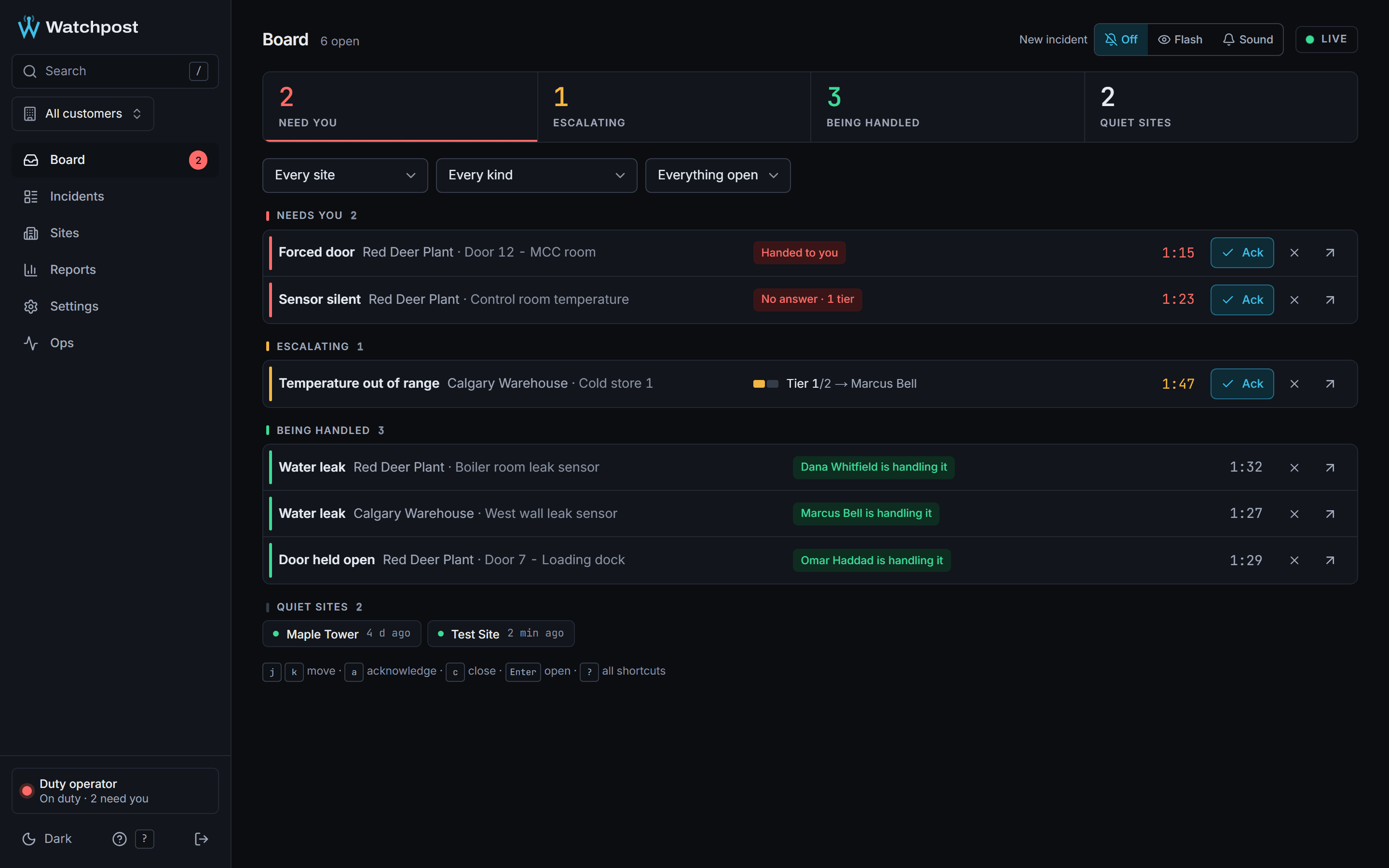
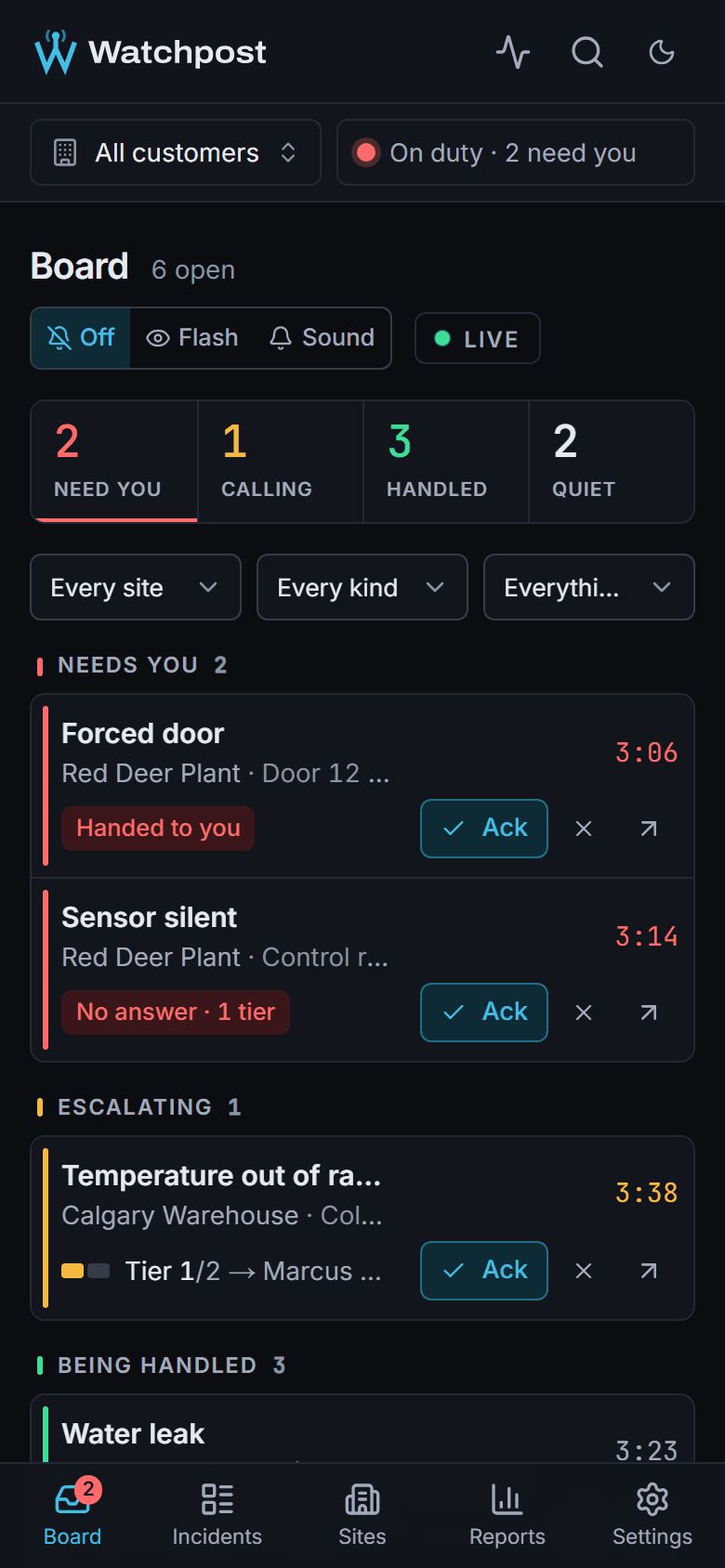
One list, ordered by who needs a person.
- Needs you, escalating, being handled, quiet
- A running clock on every incident
- Acknowledge or close from the keyboard
Real screens from the console, with demo customers.
For the person on call
No app. One text, one call, one tap.
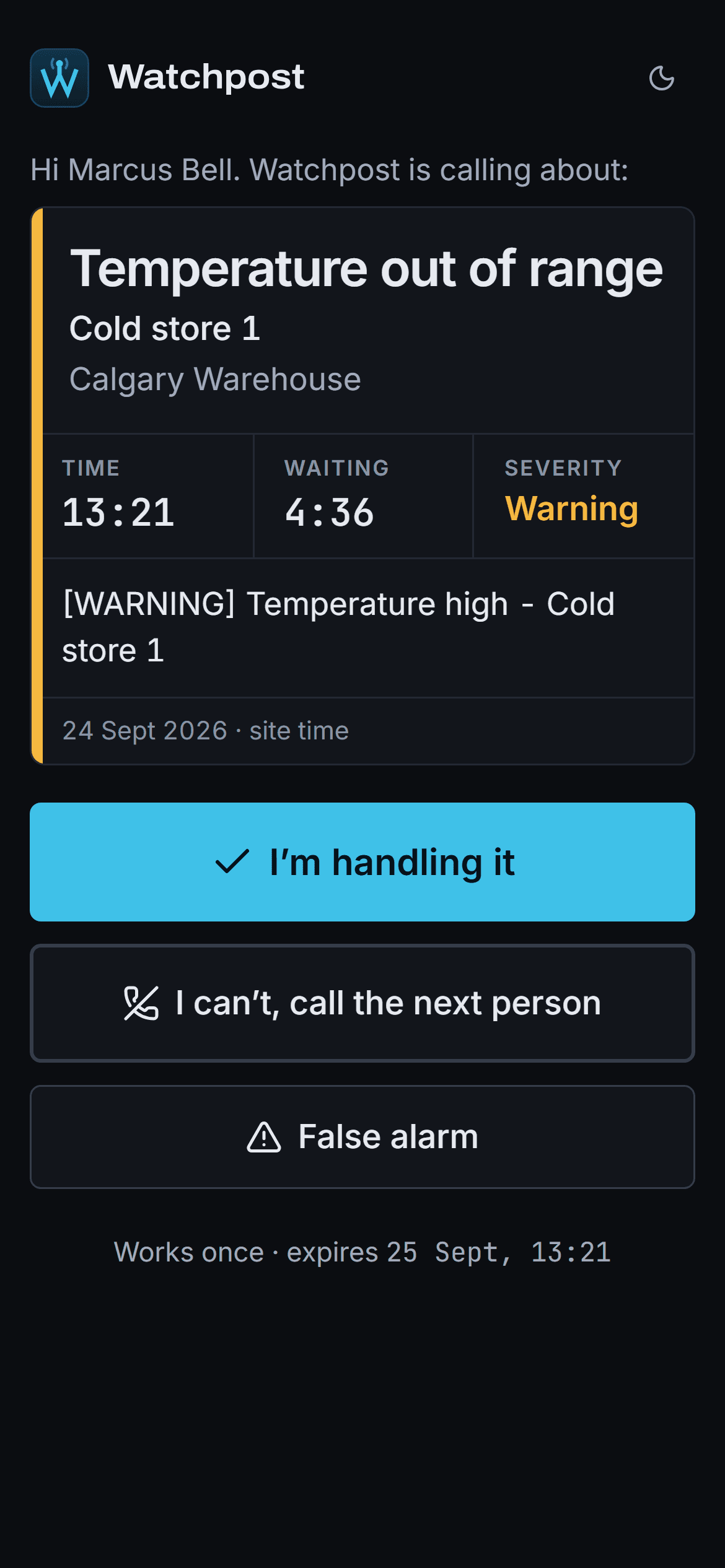
Whoever is on call, at noon or at 3 a.m., gets a text and a call saying what happened, where and when, and answers in a second. Press 1 and Watchpost stops calling everyone else.
- 1
- Handling it
- 2
- Escalate
- 3
- False alarm
By keypad, by voice, or on the answer page from the text.
“Hello Marcus. This is Watchpost monitoring for Calgary Warehouse. At 12:22, Cold store 1 reported a warning temperature… Press 1 or say handling it if you are taking this.”
What comes with every site
Built like the thing it replaces: a monitoring station.
The dull parts are the important parts. Here is what is running behind every incident on every plan.
One incident, not fifty alerts
Repeats of the same signal join the open incident. Five door events in a minute page once.
Timers that survive anything
Escalations are stored in the database with the incident. A restart never forgets who is next.
Versioned protocols
Change a protocol any time; running incidents finish on the version they started with.
Quiet hours and maintenance
Hold back or downgrade signals during a window. Life-safety signals always get through.
Runbooks beside the incident
What to check, per signal type, filled in with this incident's facts.
Response targets
An acknowledgement target per signal type, breaches on the timeline, attainment per month.
Daily and weekly digests
What happened overnight, in one email to the people who need it.
Audit log
Every change to a contact, protocol or setting, with who made it and when.
Watchpost watches itself
Heartbeats, a minute-by-minute safety sweep and a watchdog that pages us before you notice.
Roles for your team
Operators, site admins and read-only viewers. Each customer sees only its own sites.
Your data, exportable
Every incident and timeline as JSON or CSV, whenever you ask. No lock-in.
Signed and encrypted
Signed webhooks with a replay window, secrets encrypted at rest, every signal stored before we answer.
People and AI
AI runs the script. A person makes the calls that matter.
Known signals are handled by plain rules first. The model only sees what the rules cannot place — and when it is unsure, a Watchpost operator is paged instead of guessing.
What the AI does
- Reads signals it has never seen and sorts them by type and urgency
- Makes the calls and understands “handling it”, “escalate”, “false alarm”
- Drafts the incident report from the timeline
- Answers a caller who goes off-script — or hands them to a person
What it never does
- Decides to dispatch anyone
- Declares a life-safety signal resolved
- Speaks to emergency services
- Sends you an incident report a person has not approved
What Watchpost is not
Watchpost is not a ULC-listed fire alarm monitoring station. Fire alarms that your insurer or the fire code require to be monitored must stay with a listed station. We watch the operational and security signals around them — doors, leaks, temperature, equipment, sites going quiet — where the daily risk is.
Who it is for
For anyone whose building already knows — and needs someone to act.
Plants and industrial sites
Forced doors on the MCC room, equipment faults at night, a site that stops reporting.
forced doorequipment faultsite offlineProperty managers
Leaks, doors held open and after-hours access across a portfolio, with one call-out order per building.
leakheld doorsensor silentCold storage and warehouses
A cold store warming up gets a person on it before the stock is lost — not in the morning email.
temperaturesite offlineBuilding-tech platforms
Offer your customers “someone will answer” without staffing a desk. Your platform keeps knowing; we make sure someone acts.
any webhookoutcomes posted back
Pricing
Per site, per month. Not per person.
Put everyone who should be called on the list. Start with one site and add the rest when it has earned it.
Notify+
For sites with your own people on call.
$149/ site / monthCAD, before tax
Book a demo- Every signal becomes one incident with a clock
- SMS, voice call and email, tier by tier
- Escalation on timers that survive restarts
- One-tap acknowledge page, no app to install
- Quiet hours and maintenance windows
- Runbooks beside every incident
- Daily and weekly digests
- With an operator
Verified
A Watchpost operator on the escalation path.
$349/ site / monththen $25 per verified incident beyond 10 a month
Book a demo- Everything in Notify+
- A Watchpost operator takes over when your tiers run out
- Dispatch to the providers you name, only when you authorise it
- Response targets per signal type, with attainment
- Incident reports reviewed before they reach you
- Monthly site report as a PDF
Guarded
Someone watching in real time, during hours you agree.
Quotedper site, for the hours you need
Talk to us- Everything in Verified
- An operator watching live during agreed hours
- Attendance through a licensed guard partner, arranged per site
- Protocols written with you, reviewed quarterly
Prices in Canadian dollars, before tax. Pay by card or pre-authorised debit, or on invoice. A verified incident is a real incident at the site: test signals and anything your quiet hours held back never count.
Questions
What buyers ask us first.
Something else? Ask it in the form below — a person answers.
Do we need a developer to connect?
No. If your system can send a webhook, send an email, or has an API we can read with a key, you are connected by configuration in our console. A test button shows every step a signal takes, so you know it works before the first real one.
Which systems work with Watchpost?
Access control, building management, leak and temperature sensors, IoT platforms, and alarm panels that send email. If it can tell someone that something happened, it can tell Watchpost.
Do the people we call need an app?
No. They get a text, a phone call and an email. They answer by pressing 1, 2 or 3, by saying it, or on the one-tap page linked in the text.
What happens if Watchpost itself has a problem?
Every signal is stored before we answer it. Escalation timers live in the database with the incident, a sweep every minute re-arms anything that was lost, and a watchdog pages our operator if the system stalls. Your own platform keeps alerting as it does today: Watchpost adds a response on top, it does not replace what you have.
Is Watchpost a fire alarm monitoring station?
No. We are not a ULC-listed station, and fire alarms that must be monitored by one should stay there. We watch the operational and security signals around them.
Will you call the police?
Not on our own. Watchpost dispatches only to providers you name, and only where your protocol authorises it. Emergency services are called only if your contract says so.
How do you deal with false alarms?
Every incident closes with a reason. Patterns — a door that trips every morning at 7 — show up as suggested changes, like a maintenance window, and your monthly report shows the false-alarm rate so you can see it fall.
What data do you keep, and can we take it with us?
The names, numbers and emails of the people you want called, the signals your systems send, and the timeline of each incident. You can export all of it as JSON or CSV at any time.
How long does setup take?
Five steps in the console: the site, the people, the protocols, the source and a test signal. We set up your first site with you.
Book a demo
See one of your own sites handled, live.
Thirty minutes. Tell us what your systems send today; we set it up in front of you and fire a test signal through to your phone.
- 01You tell us one site and the alarms it sends.
- 02We connect it in the console while you watch — no code on your side.
- 03A test signal rings your phone. Press 1. See the timeline and the report.